umbrelOS 2.0: what's new, and can it run VMs inside a VM?
Umbrel sent me an Umbrel Home to review, and umbrelOS 2.0 just shipped (Sept 22, 2026) — their biggest release ever. Before I touch the real hardware, I wanted to know two things: what's actually in 2.0, and whether the headline "Machines" feature (running Windows/Ubuntu/Android inside Umbrel) works when Umbrel itself is a VM. That second question matters for anyone who wants to try umbrelOS before buying hardware — or who, like me, wants a throwaway test instance.
Short answer: yes, nested VMs work — with one display quirk. Here's the full run-through.
What's new in umbrelOS 2.0
- Photos — an Immich competitor: auto-organizes by year/month/day, albums, favorites, Live Photos, panoramas.
- Umbrel for iPhone/Mac — background camera-roll backup, even when the app is closed.
- Machines — run full OSes (Ubuntu, Debian, Fedora, Alpine, Windows 11/Server/7/XP/98, Android via Waydroid) inside Umbrel.
- MCP server for AI agents + one-click Hermes Agent and OpenClaw in the app store.
- Multiple user accounts, GPU acceleration, a new App Store, Storage Manager with FailSafe (RAID), downloads from cloud storage.
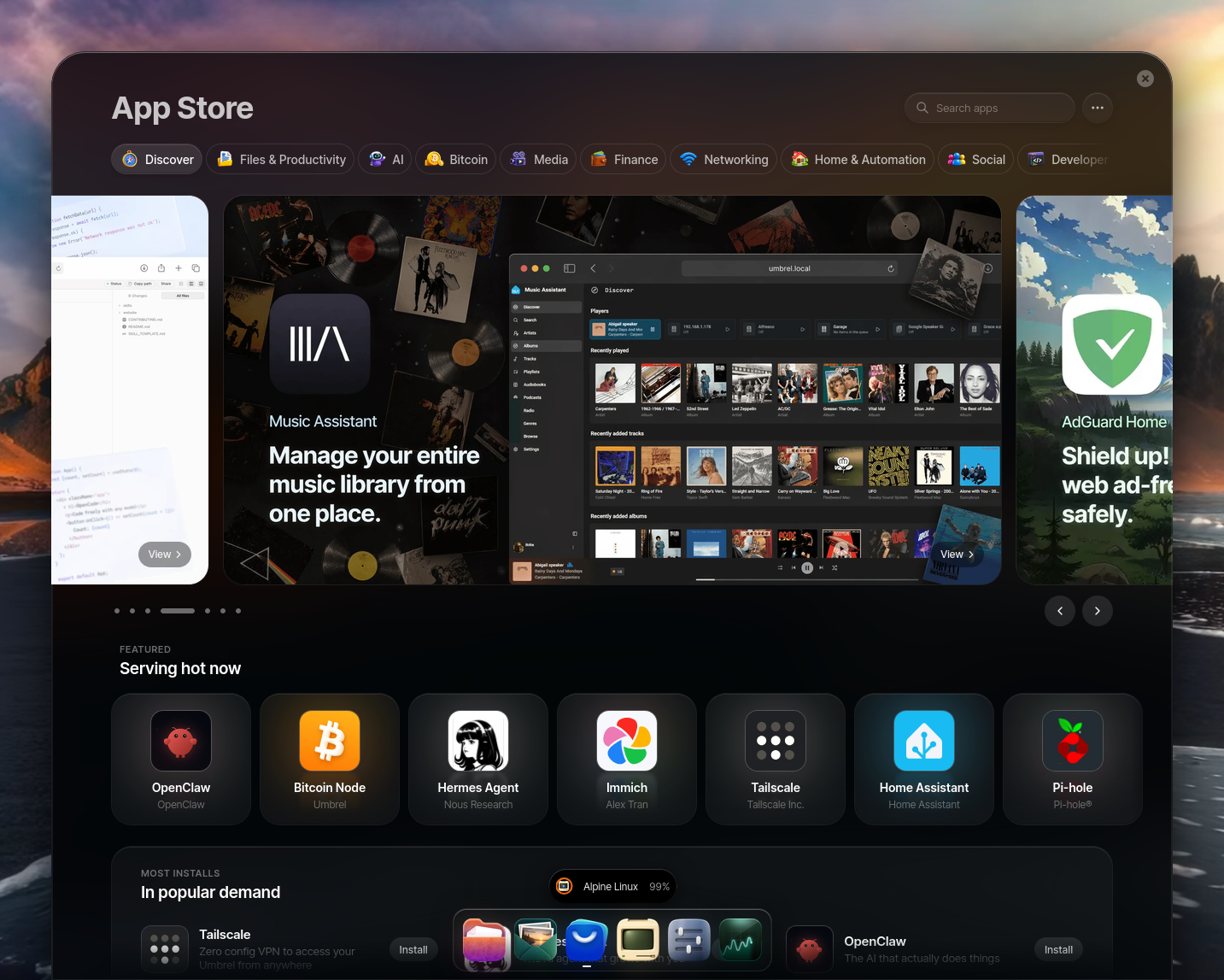
The app store is the headline for self-hosters: Hermes Agent (Nous Research), OpenClaw, Immich, Home Assistant, Pi-hole, Tailscale, Bitcoin Node, Music Assistant, AdGuard Home — plus a dedicated AI category.
Running umbrelOS in a VM
umbrelOS ships as a raw disk image (umbrelos-amd64.img.xz) and an installer ISO. For a VM, the docs are explicit: EFI boot is required — legacy BIOS won't work.
I ran it on my Fedora workstation (KVM/libvirt, i7-11700, nested_intel=Y):
# download + convert
curl -sSfL -o umbrelos-amd64.img.xz https://download.umbrel.com/release/2.0.0/umbrelos-amd64.img.xz
unxz umbrelos-amd64.img.xz
qemu-img convert -f raw -O qcow2 umbrelos-amd64.img umbrelos.qcow2
qemu-img resize umbrelos.qcow2 64G

# create with UEFI (OVMF), bridged to the LAN
virt-install --connect qemu:///system --name umbrelos --memory 8192 --vcpus 4 \
  --os-variant debian12 --import --cpu host-model \
  --boot loader=/usr/share/OVMF/OVMF_CODE.fd,loader_ro=yes,loader_type=pflash,nvram_template=/usr/share/OVMF/OVMF_VARS.fd \
  --disk path=.../umbrelos.qcow2,bus=sata \
  --network bridge=br0,model=virtio --graphics vnc --noautoconsole
Two boot gotchas (so you don't repeat them)
- SeaBIOS hangs. My first attempt used the default legacy BIOS — the console sat at "Booting from Hard Disk…" forever. umbrelOS is UEFI-only.
- Secure Boot rejects the EFI binary. With the
secbootOVMF variant, the guest firmware printedAccess Denied -- rejected probably by Secure Boot. Use the non-secbootOVMF_CODE.fd(or disable Secure Boot in the guest's NVRAM).
With plain OVMF it boots to umbrel login: and the web UI at http://umbrel.local (bridged networking is what makes that resolve).

The nested-VM test: Machines inside a VM
This is the real question. I created an Alpine Linux machine (202 MB) from the Machines catalog — that's a VM running inside umbrelOS, which is itself a VM.
The compute side works. The outer QEMU command line exposes virtualization into the guest:
vmx=on means Intel VT-x is visible inside umbrelOS, so its own QEMU can use KVM for the nested Alpine machine. CPU-time sampling confirms real work: the guest burned 319.5s → 352.1s of CPU in 30s of wall time while the Alpine machine "installed" — that's the nested VM genuinely executing, not a hang.
The one quirk: nested display
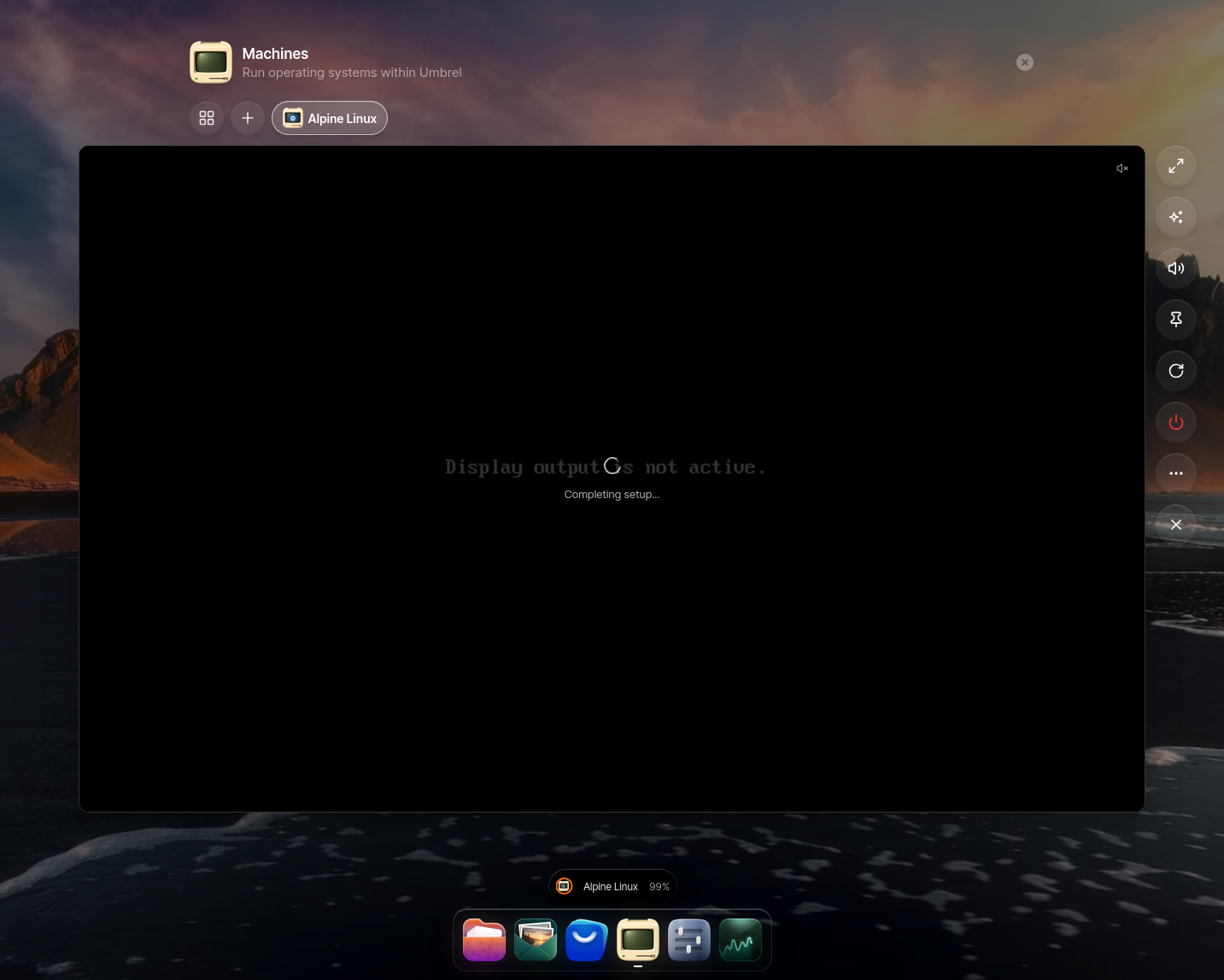
The in-browser console for the nested machine stayed at "Display output is not active." at 99%. The VM is running (CPU climbing, Restart/Shut-down enabled), but umbrelOS's viewer doesn't attach to the nested framebuffer. This is a two-layer-QEMU display limitation — on real Umbrel hardware (one layer of QEMU) the console renders normally. For a VM test, the workaround is to talk to the nested machine over the network rather than its console.
MCP: 38 tools, full control
umbrelOS 2.0 ships a built-in MCP server (Settings → AI agents → MCP, Beta). Out of the box it exposes 7 read-only tools; once you grant permissions it goes to 38 — app install, file management (create/copy/move/rename/trash/search), OS updates, restart, and full machine control (start/stop/screenshot/create).
I wired it straight into Hermes (mcp_servers.umbrel in config.yaml) and it connected in 180 ms. Two gotchas for anyone scripting this:
- The token is truncated in the UI. The "Connect an agent" screen shows
umbrelmcp_…with a literal ellipsis — the full token is only in themcp.createTokenresponse. Don't copy-paste from the UI. - The server 401s for a few minutes after enabling. It's still starting up; wait it out.
The permission schema is picky: files needs absolute paths (/Home, /External, /Network), apps/machines need real IDs (not *), and appStore/manageSystem/createMachines are booleans.
The nested-virt verdict, in umbrelOS's own words
get_machine_details on the Alpine machine reports "acceleration": "kvm" — hardware-accelerated KVM inside a VM inside a VM. CPU 25%, 154 MB RAM, IP 10.203.0.2. That's the proof.
The one limitation: get_machine_screenshot returns a 640×480 "Display output is not active" placeholder, and the machine's first-boot setup agent hangs at 100% (installationState: setting-up). The VM computes fine; the framebuffer just doesn't attach through two QEMU layers. On real hardware this won't happen.
The app store: one-click, and the arr stack really does auto-wire
Via MCP I installed Jellyfin, Immich, Radarr, AdGuard Home, Nginx Proxy Manager, qBittorrent, Sonarr, and Prowlarr — all ready in under two minutes, every port answering. The store has the full arr stack (radarr, sonarr, lidarr, bazarr, prowlarr, qbittorrent, transmission, autobrr, jackett), both Pi-hole and AdGuard Home, and proxies: Nginx Proxy Manager, Zoraxy, Cloudflare Tunnel. No Traefik, no Caddy, no HAProxy.
The auto-wiring is real, not marketing. Reading the actual compose files on disk (/home/umbrel/umbrel/app-data/<app>/docker-compose.yml), each arr app ships a mac (media-app-configurator) sidecar that injects the download-client hostnames (qbittorrent_server_1:8080) and root folders (/downloads/movies). Install Radarr + qBittorrent and they find each other. That's the magic that takes a homelabnerd an afternoon of compose files, done in a click.
The two Docker worlds — and why they don't talk
Here's the architecture that took me a while to find, and it's the crux of the whole review. All store apps share one Docker bridge: umbrel_main_network (10.21.0.0/16). Containers are named <app>_server_1. That's how the arr stack wires together.
But Portainer runs its own nested Docker daemon (DinD) — dockerd --bridge dind0 --data-root /data/data, socket at /data/docker.sock. So a Portainer stack:
- cannot join
umbrel_main_network— different daemon, different network - cannot bind-mount host paths — the DinD daemon lives inside the Portainer container, so
/home/umbrel/...doesn't exist to it. Docker silently auto-creates them as empty dirs. This is exactly why Umbrel warns "named volumes only — bind-mount data is lost on Portainer update." I hit this live: my first Traefik config mounted as an empty directory and the container crash-looped.
So umbrelOS is two Docker worlds that don't share a network: the store (one-click, auto-wired, immutable) and Portainer (real Docker, but nested, backup-blind, isolated from store apps).
Can you run CrowdSec + your own geo/ASN blocker? Yes — proven
This is the power-user test that matters. I built a Portainer stack mirroring my Pangolin edge: Traefik + my own geoblock-service (ForwardAuth) + CrowdSec + a whoami target, all on the Portainer edge network.
The gotchas, in order, because they're the real story:
- Bind mounts must be DinD-visible paths (
/data/...), not host paths — see above. - Traefik v3 moved
accessLogto top-level (not underlog). - The geoblock ForwardAuth route is
/verify, not/validate. - Traefik must trust the incoming
X-Forwarded-For(forwardedHeaders.trustedIPs) or the blocker sees the proxy's LAN IP andallow_lanbypasses everything.
With those fixed, the chain works. Spoofing X-Forwarded-For through Traefik:
| Client (X-Forwarded-For) | Rule | Result |
|---|---|---|
| 24.24.24.24 (Comcast, US) | residential | 200 |
| 71.218.154.144 (my home WAN) | residential | 200 |
| 52.94.76.1 (AWS, ASN 16509) | ASN blacklist | 403 |
| 136.243.1.1 (Hetzner, ASN 24940) | ASN blacklist | 403 |
| 1.1.1.1 (Cloudflare, AU + ASN) | country + ASN | 403 |
| 78.100.1.1 (Germany) | country whitelist (US only) | 403 |
| sqlmap User-Agent | UA blacklist | 403 |
| LAN direct | allow_lan | 200 |
8/8. My own geo/ASN blocker runs on umbrelOS, behind a reverse proxy, exactly like it does on the Pangolin box.
CrowdSec is live too: it tails Traefik's JSON access log (93 lines parsed via the crowdsecurity/traefik-logs parser), and its scenarios fire — http-probing, http-sensitive-files (caught my .env probes), http-crawl-non_statics. The remediation API works (cscli decisions add creates a ban). The one honest gap: the standalone fbonalair/traefik-crowdsec-bouncer wouldn't authenticate to the CrowdSec API in this nested setup (404 on every API path), so I couldn't close the ban→block loop with the sidecar bouncer. The cleaner path on umbrelOS is the native Traefik CrowdSec plugin (no sidecar, no API round-trip) — worth testing on real hardware.
Verdict so far
- Nested VMs work for compute — try umbrelOS 2.0 in a VM before buying hardware, and Machines will run.
- Budget for EFI + non-secure-boot OVMF if you're on KVM/libvirt.
- The display quirk is VM-only — don't let it scare you off the hardware.
- The MCP server is the sleeper feature — 38 tools, and Hermes connects in under 200 ms.
- The arr stack genuinely auto-wires — the one-click promise is real.
- Portainer is real Docker, but nested (DinD) — named volumes only, isolated from store apps. This is the seam where power-user workflows (VPN-routed arr apps, a shared security network) get hard.
- Your own geo/ASN blocker + CrowdSec run fine in a Portainer stack behind Traefik — 8/8 ASN/country/UA tests passed. The sidecar bouncer was the only rough edge.
Next up: the real Umbrel Home — the *arr/Jellyfin stack, Immich vs Photos, Nextcloud/OpenCloud, backups, and the Hermes/OpenClaw MCP angle.